- 2008 : 01 02 03 04 05 06 07 08 09 10 11 12
- 2007 : 01 02 03 04 05 06 07 08 09 10 11 12
- 2006 : 01 02 03 04 05 06 07 08 09 10 11 12
- 2005 : 01 02 03 04 05 06 07 08 09 10 11 12
- 2004 : 01 02 03 04 05 06 07 08 09 10 11 12
- 2003 : 01 02 03 04 05 06 07 08 09 10 11 12
- 2002 : 01 02 03 04 05 06 07 08 09 10 11 12
2006-02-09 Thu
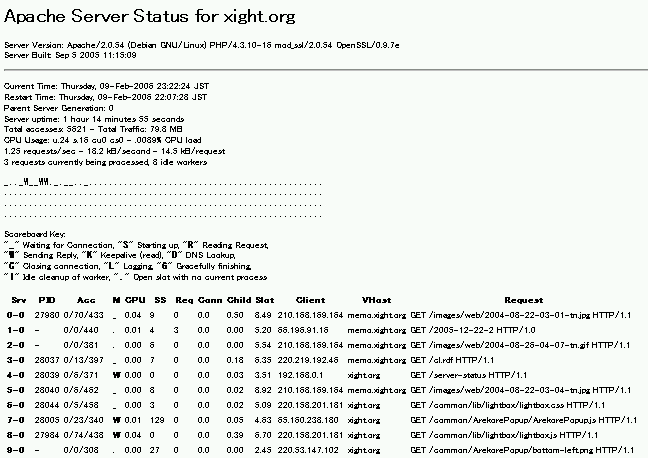
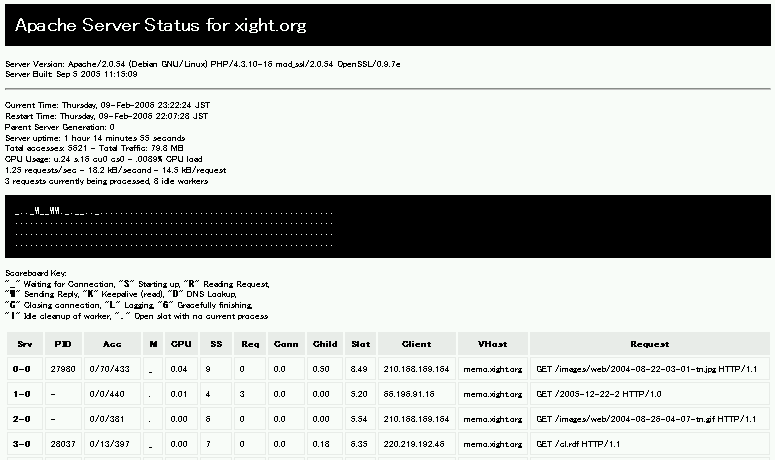
userContent.css で Apache2 の server-status を見やすくする
@-moz-document url-prefix("http://localhost/path/to/server-status") { h1 { maring: 0; padding: 10px; color: #fff; background-color: #000; } td,th { padding: 5px; border: 1px #eee solid; } th { color: inherit; background-color: #eee; } pre { padding: 10px; color: #fff; background-color: #000; } }
- Reference
Firefox まとめサイト - usercontent.css
http://firefox.geckodev.org/?usercontent.css
mew で update ができない
- Summary
12000通以上メールが存在するフォルダにて,s を入力.
2595通目以降がアップデートが出来ない.
Range (update): all
Communicating with the IMAP server...
Retrieving 12666 messages in background...
IMAP connection is lost
Range (update): update
Communicating with the IMAP server...
0 message retrieved. 9156 messages are left due to an error.
- ad hoc な解決法
ディレクトリを複数に分けたらエラーが起こらなくなった.
一つのディレクトリ内で管理できるメール数に制限があるのかもしれない.
Thunderbird は異常無し.
INBOX.debian-users
INBOX.debian-users.2002
INBOX.debian-users.2003
INBOX.debian-users.2004
INBOX.debian-users.2005
Debian で Apache2 + SSL
- Summary
Apache2 で SSL を導入する.
[2006-11-09] 変更.
- 手順
1. 鍵の生成
2. SSL用 confファイル作成
3. VirtualHost とSSLモジュールの有効化
4. apache の再起動
- /etc/apache2/ssl/apache.pem を作成
/etc/apache2/ssl ディレクトリがないと以下のように怒られる.
# apache2-ssl-certificate
creating selfsigned certificate
replace it with one signed by a certification authority (CA)
enter your ServerName at the Common Name prompt
If you want your certificate to expire after x days call this programm
with -days x
Generating a 1024 bit RSA private key
.................++++++
......++++++
writing new private key to '/etc/apache2/ssl/apache.pem'
/etc/apache2/ssl/apache.pem: No such file or directory
26068:error:02001002:system library:fopen:No such file or directory:bss_file.c:278:fopen('/etc/apache2/ssl/apache.pem','w')
26068:error:20074002:BIO routines:FILE_CTRL:system lib:bss_file.c:280:
/etc/apache2/ssl ディレクトリを作成し,再実行
apache2-ssl-certificate で作成する鍵の有効期限はデフォルトで30日なので,1年に延長.
# mkdir /etc/apache2/ssl
# apache2-ssl-certificate -days 365
creating selfsigned certificate
replace it with one signed by a certification authority (CA)
enter your ServerName at the Common Name prompt
If you want your certificate to expire after x days call this programm
with -days x
Generating a 1024 bit RSA private key
.......++++++
..........++++++
writing new private key to '/etc/apache2/ssl/apache.pem'
-
You are about to be asked to enter information that will be incorporated
into your certificate request.
What you are about to enter is what is called a Distinguished Name or a DN.
There are quite a few fields but you can leave some blank
For some fields there will be a default value,
If you enter '.', the field will be left blank.
-
Country Name (2 letter code) [GB]:JP
State or Province Name (full name) [Some-State]:Tokyo
Locality Name (eg, city) []:XXXXXX-ku
Organization Name (eg, company; recommended) []:example.com (組織名)
Organizational Unit Name (eg, section) []:
server name (eg. ssl.domain.tld; required!!!) []:example.com (ドメイン名:必須)
Email Address []:
- /etc/apache2/sites-available/ssl を作成
# cp /usr/share/apache2/config/default-443 /etc/apache2/sites-available/ssl
- /etc/apache2/sites-available/ssl を編集
- mod_sslを有効化
# a2enmod ssl
# a2ensite ssl
- Reference
日々の試行と実験: SSL導入(Debian sarge apache2)
http://golgotha.xrea.jp/archives/2006/01/ssldebian_sarge.html
klog: Debian の Apache2 で SSL セットアップ
http://5net.com/blog/2004/11/debian_apache2_ssl.html
deb/WWWサーバ - PukiWiki Plus!
http://motoka.com/wiki/?cmd=read&page=deb%2FWWW%A5%B5%A1%BC%A5%D0
SSL用証明書の作成(Linux編)
http://www.aconus.com/~oyaji/www/certs_linux.htm
- 2008 : 01 02 03 04 05 06 07 08 09 10 11 12
- 2007 : 01 02 03 04 05 06 07 08 09 10 11 12
- 2006 : 01 02 03 04 05 06 07 08 09 10 11 12
- 2005 : 01 02 03 04 05 06 07 08 09 10 11 12
- 2004 : 01 02 03 04 05 06 07 08 09 10 11 12
- 2003 : 01 02 03 04 05 06 07 08 09 10 11 12
- 2002 : 01 02 03 04 05 06 07 08 09 10 11 12

