2006-12-02 Sat
Subversion + Apache2 連携
- Summary
# aptitude install subversion subversion-tools libapache2-svn
- リポジトリを格納するディレクトリを作成
# /var/lib/svn
# svnadmin create /var/lib/svn
# chown -R www-data:www-data /var/lib/svn
- WebDAV経由でSubversionを使用するユーザのパスワードファイルを作成
# htpasswd2 -c /etc/apache2/dav_svn.passwd username
- /etc/apache2/mods-available/dav_svn.conf を編集
SVNParentPath にすることで複数のリポジトリを扱えるようになる.
<Location /svn> DAV svn # SVNPath /var/lib/svn SVNParentPath /var/lib/svn AuthType Basic AuthName "Subversion Repository" AuthUserFile /etc/apache2/dav_svn.passwd Require valid-user </Location>
- Reference
flava/hatena - 2005-07-30
http://d.hatena.ne.jp/itsumo/20050730
2006-04-17 Mon
Apache2 API Document
- Reference
Apache2 Documentation
http://www.m-takagi.org/docs/apache/api/packages.html
- via
オレンジニュース - 2006-04-13
http://secure.ddo.jp/~kaku/tdiary/20060413.html#p07
2006-02-09 Thu
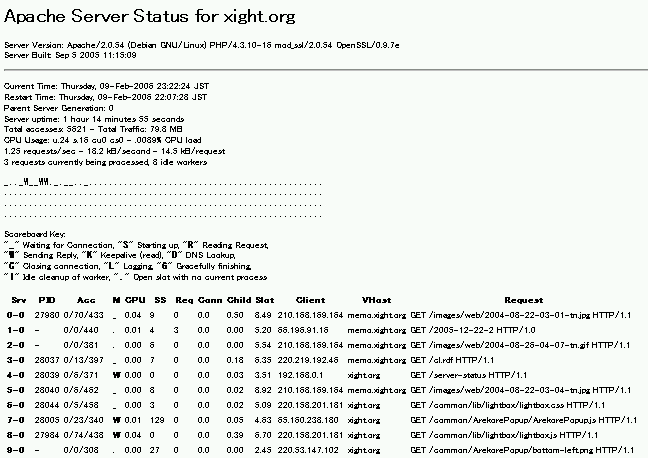
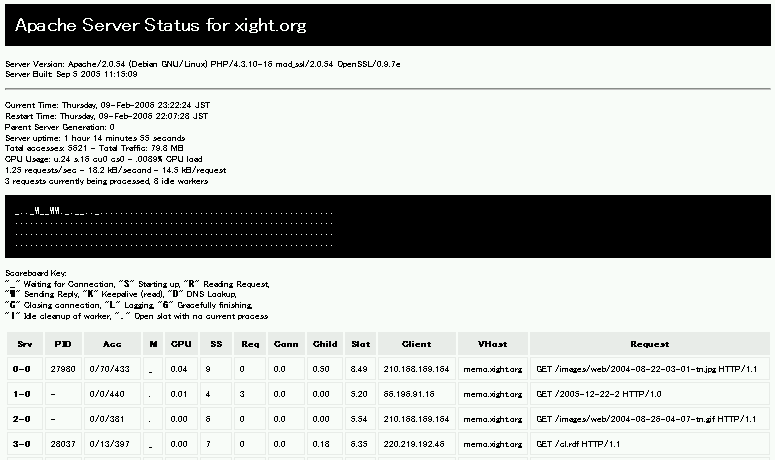
userContent.css で Apache2 の server-status を見やすくする
@-moz-document url-prefix("http://localhost/path/to/server-status") { h1 { maring: 0; padding: 10px; color: #fff; background-color: #000; } td,th { padding: 5px; border: 1px #eee solid; } th { color: inherit; background-color: #eee; } pre { padding: 10px; color: #fff; background-color: #000; } }
- Reference
Firefox まとめサイト - usercontent.css
http://firefox.geckodev.org/?usercontent.css
2006-02-09 Thu
Debian で Apache2 + SSL
- Summary
Apache2 で SSL を導入する.
[2006-11-09] 変更.
[2008-06-18] 変更.
- 手順
1. 鍵の生成
2. SSL用 confファイル作成
3. VirtualHost とSSLモジュールの有効化
4. apache の再起動
- /usr/share/ssl-cert/ssleay.cnf をコピーする
# cd /usr/share/ssl-cert
# cp ssleay.cnf custom.cnf
# vi custom.cnf
- /usr/share/ssl-cert/custom.cnf を編集
<<
- /etc/apache2/ssl/apache.pem を作成
# mkdir /etc/apache2/ssl
# make-ssl-cert /usr/share/ssl-cert/custom.cnf /etc/apache2/ssl/apache.pem
- /etc/apache2/sites-available/ssl を作成
# cp /usr/share/apache2/config/default-443 /etc/apache2/sites-available/ssl
- /etc/apache2/sites-available/ssl を編集
- mod_sslを有効化
# a2enmod ssl
# a2ensite ssl
- Reference
日々の試行と実験: SSL導入(Debian sarge apache2)
http://golgotha.xrea.jp/archives/2006/01/ssldebian_sarge.html
klog: Debian の Apache2 で SSL セットアップ
http://5net.com/blog/2004/11/debian_apache2_ssl.html
deb/WWWサーバ - PukiWiki Plus!
http://motoka.com/wiki/?cmd=read&page=deb%2FWWW%A5%B5%A1%BC%A5%D0
SSL用証明書の作成(Linux編)
http://www.aconus.com/~oyaji/www/certs_linux.htm
- [2008-06-18] 追記
Debian Etchでは
apache2-ssl-certificate ではなく,
make-ssl-certを利用する.
2003-05-21 Wed
Apache2 をとりあえず使ってみる
- インストール
# aptitude install apache2
Package apache2 is a virtual package provided by:
apache2-mpm-worker 2.0.45-3
apache2-mpm-threadpool 2.0.45-3
apache2-mpm-prefork 2.0.45-3
apache2-mpm-perchild 2.0.45-3
You should explicitly select one to install.
と怒られた.
どうやら apache2 はヴァーチャルパッケージ名らしい.
# apt-cache search apache2
| パッケージ名 | 備考 |
| apache2-mpm-perchild | Apache2 用の実験的な高速 perchild スレッド化モデル |
| apache2-mpm-prefork | Apache2 用の従来版モデル |
| apache2-mpm-threadpool | Apache2 用の実験的な高速スレッドプールモデル |
| apache2-mpm-worker | Apache2 用の高速スレッド化モデル |
よくわからないが threadpool を選んでみる.
# aptitude install apache2-mpm-threadpool
Apache もあげたままなので,Port が重複していると最後の設定時に怒られた.
- /etc/apache2/httpd.conf ファイルが空っぽなので
# cp /etc/apache/httpd.conf /etc/apache2/httpd.conf
- 基本設定
# vi /etc/apache2/httpd.conf
ServerRoot /etc/apache2 LockFile /var/lock/apache2.lock PidFile /var/run/apache2.pid ScoreBoardFile /var/run/apache2.scoreboard
- httpd.conf のファイルをチェックする
# apache2ctl -t
ServerType standalone
がエラー出るからコメントアウト
DSO 関係もエラー出るからコメントアウト
- ポート設定
Portの設定は
# vi /etc/apache2/ports.conf
Listen 80
を変更
- ディレクトリ毎の設定
/etc/apache2/sites-available/default
- SSL 初期設定
# /usr/sbin/make-ssl-cert
地域や組織名を入力
server name は絶対に入れないといけないらしい.
- 起動しないから
/etc/init.d/apache2 を見てみると…ということで
# vi /etc/default/apache2
NO_START=1を
NO_START=0に変更
- とりあえず無事起動
Apache 1 系との併用も可能