- Summary
wedata のデータベースに登録することで
AutoPagerize に対応するサイトを追加することができる。
誰でも編集可能。
- tech-seminar.jp を AutoPagerize 対応にしてみる。
[2009-12-18] 管理画面にも対応。
var SITEINFO = [ { url: '^http://tech-seminar\.jp/(?:$|seminar|admin)', nextLink: 'id("squeeze")//li[@class="pager-next"]/a|id("squeeze")//span[@class="next"]/a', pageElement: 'id("squeeze")//div[@class="view-content"]/div[contains(concat(" ", @class, " "), " views-row ")]|id("squeeze")//form/div/table', exampleUrl: 'http://tech-seminar.jp/', }, ]
- Summary
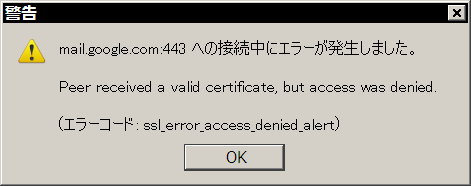
Firefox で Gmail に接続すると、以下のようなエラーメッセージが表示される。
mail.google.com:443 への接続中にエラーが発生しました。
Peer received a valid certificate, but access was denied.
(エラーコード: ssl_error_access_denied_alert)

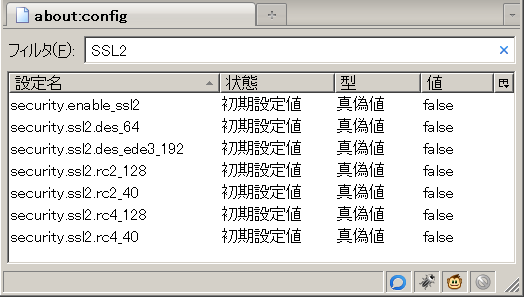
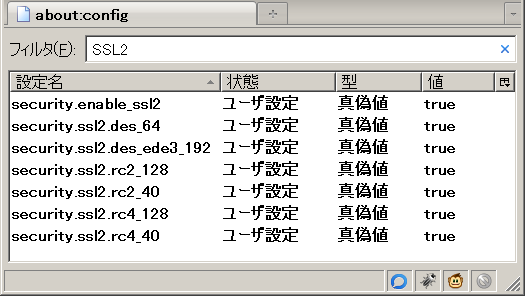
原因は、SSL2, SSL3の一部が無効になっていること
- about:config 変更前

- about:config 変更後
SSL2 で検索し、全てを true に変更。

同様に、 SSL3 で検索し、全てを true に変更して完了。
- Reference
ssl_error_access_denied_alert - Google Mail Problem Solving | Google グループ
http://groups.google.com/group/google-mail-problem-solving-uk/browse_thread/thread/7f15e723c5d41a0d
ssl_error_access_denied_alert
http://support.mozilla.com/tiki-view_forum_thread.php?comments_parentId=151499&forumId=1
- Summary
SpeedyFox で SQLiteファイルを最適化。
Fireboot で アドオンの不要な言語ファイルを削除する。
- Reference
SpeedyFox - Boost Firefox in a Single Click! | CRYSTALIDEA Software
http://www.crystalidea.com/speedyfox
Fireboot
http://pearl-white.hp.infoseek.co.jp/fireboot/
- via
Mozilla Re-Mix: Firefoxのデータベースファイルを最適化して高速化できるローカルソフトウェア「SpeedyFox」(Win)
http://mozilla-remix.seesaa.net/article/127156686.html
Mozilla Re-Mix: アドオンから不要な言語ファイルを削除してFirefoxの起動を高速化するソフトウェア「Fireboot」
http://mozilla-remix.seesaa.net/article/112689126.html
- Summary
Firefox 3の各種メニューアイコンをカスタマイズできるアドオン。
CuteMenus がメンテナンスされていないようなので、乗り換え。
- Reference
Menu Icons Plus :: Add-ons for Firefox
https://addons.mozilla.org/en-US/firefox/addon/8266
- via
Mozilla Re-Mix: Firefox 3の各種メニューアイコンなどをグラフィカルにカスタマイズできるアドオン「Menu Icons Plus」
http://mozilla-remix.seesaa.net/article/104007618.html
- Summary
Firefoxでは、 Ctrl+F で開いた検索窓を
Ctrl+F で閉じられない。
これを解決するのが、 "Hide Find Bar with Ctrl+F" 。
vi使いには "Hide Find Bar with ESC" のほうがしっくりくる。。
- Reference
Hide Find Bar with Ctrl+F :: Add-ons for Firefox
https://addons.mozilla.org/ja/firefox/addon/14188
- via
頭ん中 - 2009-10-20 - Firefoxの検索窓に関して最も残念なところを補うアドオン: Hide Find Bar with Ctrl+F
http://www.msng.info/archives/2009/10/firefox_hide_find_bar_with_ctrlf.php
- Summary
Firefox, Thunderbird でプロファイルを指定して起動、
異なるプロファイルを指定して Firefox,Thunderbird を同時に起動する方法。
- プロファイルを指定して Firefox を起動
"C:\path\to\firefox\firefox.exe" -p profile_name
- 異なるプロファイルを使用して Firefox を同時起動
"C:\path\to\firefox\firefox.exe" -no-remote -p profile_name
- プロファイルを指定して Thunderbird を起動
"C:\path\to\thunderbird\thunderbird.exe" -p profile_name
- 異なるプロファイルを使用して Thunderbird を同時起動
"C:\path\to\thunderbird\thunderbird.exe" -no-remote -p profile_name
- Reference
プロファイル - Mozilla Firefox まとめサイト
http://firefox.geckodev.org/index.php?%E3%83%97%E3%83%AD%E3%83%95%E3%82%A1%E3%82%A4%E3%83%AB
- Summary
表示しているWebページの情報をWebサービスに投稿するためのFirefox拡張。
元々はTumblr専用ツールだったが、対応するWebサービスが増加し、汎用的になった。
- Reference
GitHub - Tombloo
http://wiki.github.com/to/tombloo
GitHub - Tombloo - Tips
http://wiki.github.com/to/tombloo/tips
はてなダイアリー - brazil
- via
Tomblooこそ自分をGoogle化する最強のツール - Future Insight
http://d.hatena.ne.jp/gamella/20080715/1216134770
- Summary
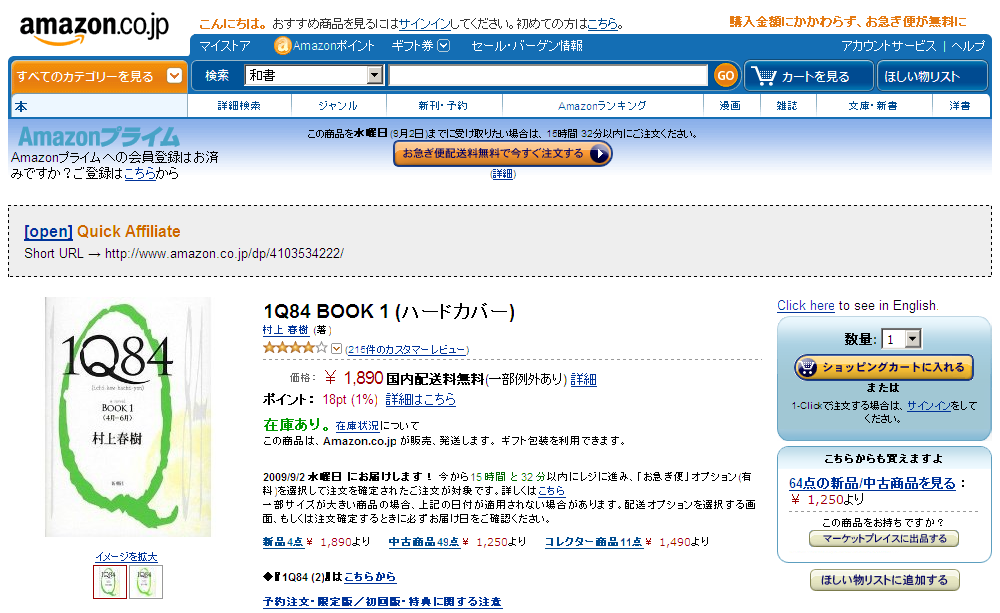
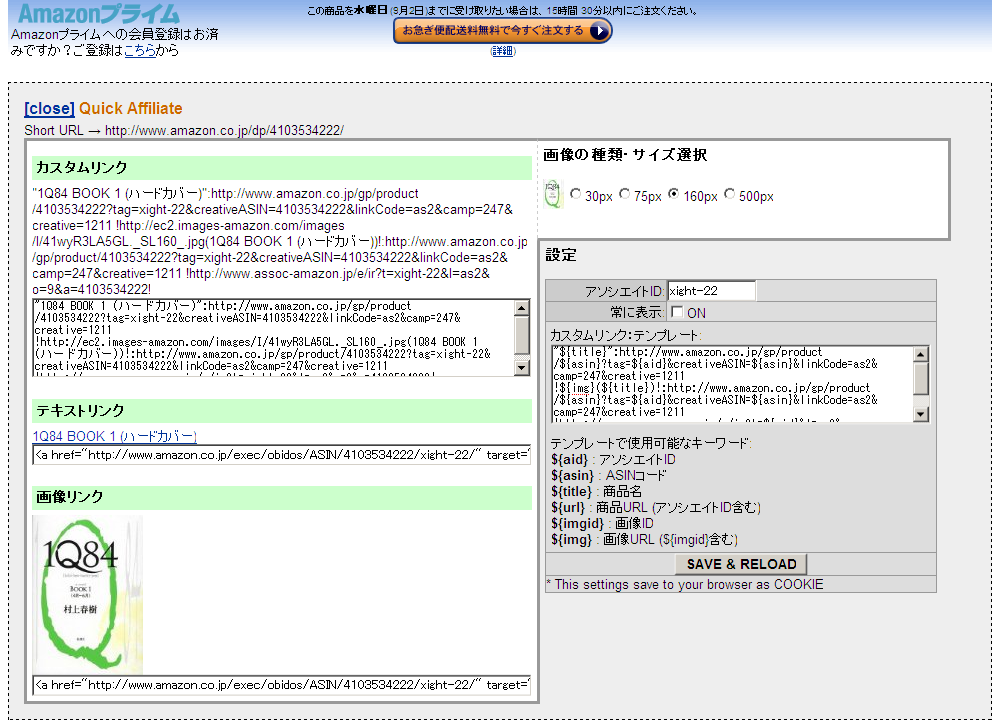
Amazonの商品ページを表示中にアソシエイトID付きのHTMLをコピーできる。
Greasemonkeyを利用。

フォーマットを指定することで、様々なテキストを出力可能。
- Textile形式のフォーマット その1 (Old style)
"${title}":${url}
!${img}(${title})!:${url}
!http://www.assoc-amazon.jp/e/ir?t=${aid}&l=as2&o=9&a=${asin}!
- Textile形式のフォーマット その2 (New style)
"${title}":http://www.amazon.co.jp/gp/product/${asin}?tag=${aid}&creativeASIN=${asin}&linkCode=as2&camp=247&creative=1211
!${img}(${title})!:http://www.amazon.co.jp/gp/product/${asin}?tag=${aid}&creativeASIN=${asin}&linkCode=as2&camp=247&creative=1211
!http://www.assoc-amazon.jp/e/ir?t=${aid}&l=as2&o=9&a=${asin}!
- Reference
Amazonの商品を最速でブログにコピペできるGreasemonkey「Amazon Quick Affiliate (JP)」 [C!]
http://creazy.net/2009/03/amazon_quick_affiliate_greasemonkey.html
- Summary
Firefoxでモバイル端末をシミュレートするアドオン.
- 主な機能 (開発元より引用)
- [全キャリア]UID送信
- [DoCoMo]UTN送信
- [DoCoMo]iモードID送信
- [全キャリア]絵文字表示
- DoCoMoのUnicode16進数値参照(例:$#xE70C;)
- DoCoMoのSJISバイナリ
- SoftBankのWebコード(ESC $ + SJISコード + SI の記載方法)
- Auの<img localsrc="iconno">方式
- [SoftBank]端末製造番号送信
- [全キャリア]User-Agent偽装
- [全キャリア]各種HTTPリクエストヘッダのシミュレート
- 端末情報の追加・編集・削除機能
- Content-type:text/vnd.wap.wmlとapplication/xhtml+xmlをtext/htmlに強制変換
(FirefoxのXML整形式チェックによる表示エラーを回避するため)
- Reference
遥かへのスピードランナー - 2008-08-16 - Firefoxでモバイル端末をシミュレートする独自アドオン「FireMobileSimulator」を公開します
http://d.hatena.ne.jp/thorikawa/20080816/1218908754
- via
ke-tai.org - 2008-09-04 - Firefoxでモバイル端末をシミュレートするアドオン「FireMobileSimulator」
http://ke-tai.org/blog/2008/09/04/firemobilesimlator/
- Summary
キーボードによる操作を快適にするFirefoxアドオン.
about:ubiquity
で ubiquityの設定が可能.
Ubiquityで以下コマンドを入力することで,新規コマンドの追加が可能.
command-editor
- Reference
Mozilla Labs - Blog Archive - Introducing Ubiquity
http://labs.mozilla.com/2008/08/introducing-ubiquity/
- via
Firefox Hacks:ブラウザの新境地 - Ubiquityが変える衝撃のブラウザ体験 (1/2) - ITmedia エンタープライズ
http://www.itmedia.co.jp/enterprise/articles/0808/31/news003.html
- Reference
FireGestures :: Firefox Add-ons
https://addons.mozilla.org/ja/firefox/addon/6366
FIREGESTURES :: Get Scripts
http://www.xuldev.org/firegestures/getscripts.php?lang=ja
- via
Firefoxマウスジェスチャーの新定番「FireGestures」 :教えて君.net
http://www.oshiete-kun.net/archives/2008/02/firefoxfiregestures.html
- Summary
Firefoxのロケーションバーの機能を拡張する.
* ドメインを強調表示.
* URLエンコードされた文字をデコードした状態で表示.
* Shift を押しながらアドレスバーにマウスカーソルを合わせると,ディレクトリにアクセスできる.
- Reference
design-noir - Mozilla - Locationbar2
http://en.design-noir.de/mozilla/locationbar2/
- via
窓の杜 - Webサイトのディレクトリ移動を容易にするFirefox拡張機能「Locationbar2」
http://www.forest.impress.co.jp/article/2007/02/28/locationbar.html
- Reference
userChrome.js 用スクリプト: Days on the Moon
http://nanto.asablo.jp/blog/2006/12/31/1083170
- Summary
navigator.registerContentHandler("application/vnd.mozilla.maybe.feed", "http://www.theeasyreaderurl.com?feed=%s", "Easy Reader");
- Reference
http://maps.google.com/?ll=45.123772,-123.113917&t=h
The Road to Firefox 2 - Behind the Scenes: The Firefox crop circle!
http://www.firefoxflicks.com/web-diaries/?p=96
Linux Users Group - Oregon State University
http://lug.oregonstate.edu/index.php/Projects/Firefox/Firefox_Circle
- via
MOONGIFTニュース - 2006-11-30 - Firefox on Google Maps
http://news.moongift.jp/i-2941.html
GIGAZINE - 2006-11-30 - Googleマップで見られる巨大Firefoxロゴ
http://gigazine.net/index.php?/news/comments/20061130_google_firefox_logo/
- Summary
閲覧ページ内に付箋紙 (メモ) を貼り付けることができ,再びそのページに訪れた時,貼り付けた付箋紙が同じ場所に表示される.
付箋紙は閲覧ページの好きな場所へ動かして複数枚貼り付けることができ,付箋の文字色/背景色を変更することも可能.
Internote Managerでは各Webページに貼り付けた付箋紙の内容やURLを管理/編集することが可能.
- Reference
SourceForge - Internote
http://internote.sourceforge.net/
Internote | Firefox Add-ons | Mozilla Corporation
https://addons.mozilla.org/firefox/2011/
Firefox更新情報 Wiki - Internote
http://wikiwiki.jp/firefox/?Ext%2FInternote
InterNote: Extending a Hypermedia Framework to Support Annotative Collaboration
http://pitecan.com/bib/Catlin_InterNote.html
sta la sta - Webの好きな場所へ付箋紙を貼れるFirefox拡張機能 - MyStickies
http://d.hatena.ne.jp/starocker/20060120/p2
- via
窓の杜 - Webページごとに付箋紙を貼り付けられるFirefox拡張機能「Internote」
http://www.forest.impress.co.jp/article/2006/11/28/internote.html
- Reference
Mozilla Corporation - Firefox Add-ons - Link Alert
https://addons.mozilla.org/firefox/3199/
- via
GIGAZINE - リンク先が何のファイルかわかるFirefoxの拡張機能「Link Alert」
http://gigazine.net/index.php?/news/comments/20061123_link_alert/
- Reference
gotinの日記 - 2006-10-17 - GreasemonkeyでRSSリーダー
http://d.hatena.ne.jp/gotin/20061017
AUSGANG SOFT - 2006-11-21 - Greasemonkeyでテキストエディタ
http://a-h.parfe.jp/einfach/archives/2006/1121172220.html
- Summary
サンプルコードを探すのに便利.
<OpenSearchDescription> <ShortName>Google Code Search</ShortName> <Description>Google Code Search</Description> <InputEncoding>utf-8</InputEncoding> <Image width="16" height="16">http://www.google.com/favicon.ico</Image> <Url type="text/html" method="GET" template="http://www.google.com/codesearch?q={searchTerms}"/> </OpenSearchDescription>
- Summary
以下設定が必要らしい.
/charset iso-2022-jp
- Reference
http://www.hacksrus.com/%7Eginda/chatzilla/
- via
http://www.preston-net.com/wiki/?%5B%5BGoingMyWay%A5%C1%A5%E3%A5%F3%A5%CD%A5%EB%5D%5D