- 2008 : 01 02 03 04 05 06 07 08 09 10 11 12
- 2007 : 01 02 03 04 05 06 07 08 09 10 11 12
- 2006 : 01 02 03 04 05 06 07 08 09 10 11 12
- 2005 : 01 02 03 04 05 06 07 08 09 10 11 12
- 2004 : 01 02 03 04 05 06 07 08 09 10 11 12
- 2003 : 01 02 03 04 05 06 07 08 09 10 11 12
- 2002 : 01 02 03 04 05 06 07 08 09 10 11 12
2005-12-28
Live HTTP Headersが "ページの情報を表示" の中の "Headers" タブで表示できない
- Summary
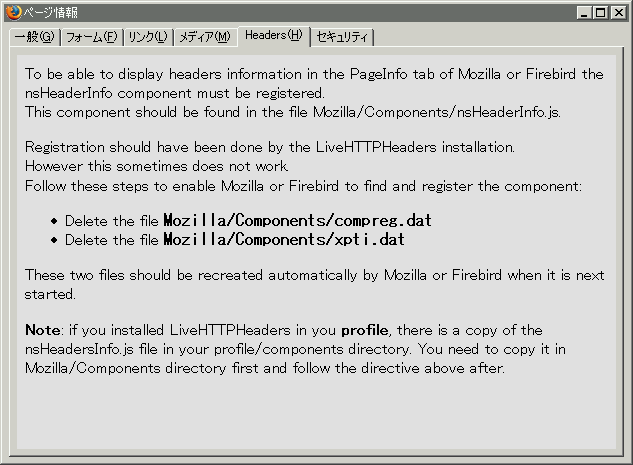
"ページの情報を表示" の中の "Headers"タブでヘッダ情報が表示ができない.
以下のメッセージが表示される.

- 内容
To be able to display headers information in the PageInfo tab of Mozilla or Firebird the
nsHeaderInfo component must be registered.
This component should be found in the file Mozilla/Components/nsHeaderInfo.js.
Registration should have been done by the LiveHTTPHeaders installation.
However this sometimes does not work.
Follow these steps to enable Mozilla or Firebird to find and register the component:
* Delete the file Mozilla/Components/compreg.dat
* Delete the file Mozilla/Components/xpti.dat
These two files should be recreated automatically by Mozilla or Firebird when it is next started.
Note: if you installed LiveHTTPHeaders in you profile, there is a copy of the
nsHeadersInfo.js file in your profile/components directory. You need to copy it in
Mozilla/Components directory first and follow the directive above after.
- 和訳
Mozilla あるいは Firebird の PageInfo タブにヘッダー情報を表示することができるように,
nsHeaderInfo のコンポーネントを登録しなければなりません.
このコンポーネントは Mozilla/Components/nsHeaderInfo.js ファイルで見つけられるでしょう.
LiveHTTPHeaders のインストール時にで登録するべきですが,時々動作しません.
以下に示すステップに従って, Mozilla あるいは Firebird がコンポーネントを登録できるようにしてください:
* Mozilla/Components/compreg.dat ファイルを削除
* Mozilla/Components/xpti.dat ファイルを削除
Mozilla あるいは Firebird の再起動後に,これらのファイルは再生成されます.
注意: LiveHTTPHeaders を自分のプロファイルでインストールしたなら,自分の profile/components ディレクトリに nsHeadersInfo.js ファイルのコピーがあります.
その場合,最初に Mozilla/Components ディレクトリにそれをコピーして,上記の指示に従ってください.
- 結果
指示に従ったが動作せず
- Reference
(ひ)メモ - Live HTTP Headersが「ページの情報を表示」の中のタブで表示できない
http://d.hatena.ne.jp/hirose31/20051222/1135249744
Firefox まとめサイト - Live HTTP headers
http://firefox.geckodev.org/?Live%20HTTP%20headers
mozdev.org - livehttpheaders
http://livehttpheaders.mozdev.org/
"ページの情報を表示" の中の "Headers"タブでヘッダ情報が表示ができない.
以下のメッセージが表示される.

- 内容
To be able to display headers information in the PageInfo tab of Mozilla or Firebird the
nsHeaderInfo component must be registered.
This component should be found in the file Mozilla/Components/nsHeaderInfo.js.
Registration should have been done by the LiveHTTPHeaders installation.
However this sometimes does not work.
Follow these steps to enable Mozilla or Firebird to find and register the component:
* Delete the file Mozilla/Components/compreg.dat
* Delete the file Mozilla/Components/xpti.dat
These two files should be recreated automatically by Mozilla or Firebird when it is next started.
Note: if you installed LiveHTTPHeaders in you profile, there is a copy of the
nsHeadersInfo.js file in your profile/components directory. You need to copy it in
Mozilla/Components directory first and follow the directive above after.
- 和訳
Mozilla あるいは Firebird の PageInfo タブにヘッダー情報を表示することができるように,
nsHeaderInfo のコンポーネントを登録しなければなりません.
このコンポーネントは Mozilla/Components/nsHeaderInfo.js ファイルで見つけられるでしょう.
LiveHTTPHeaders のインストール時にで登録するべきですが,時々動作しません.
以下に示すステップに従って, Mozilla あるいは Firebird がコンポーネントを登録できるようにしてください:
* Mozilla/Components/compreg.dat ファイルを削除
* Mozilla/Components/xpti.dat ファイルを削除
Mozilla あるいは Firebird の再起動後に,これらのファイルは再生成されます.
注意: LiveHTTPHeaders を自分のプロファイルでインストールしたなら,自分の profile/components ディレクトリに nsHeadersInfo.js ファイルのコピーがあります.
その場合,最初に Mozilla/Components ディレクトリにそれをコピーして,上記の指示に従ってください.
- 結果
指示に従ったが動作せず
- Reference
(ひ)メモ - Live HTTP Headersが「ページの情報を表示」の中のタブで表示できない
http://d.hatena.ne.jp/hirose31/20051222/1135249744
Firefox まとめサイト - Live HTTP headers
http://firefox.geckodev.org/?Live%20HTTP%20headers
mozdev.org - livehttpheaders
http://livehttpheaders.mozdev.org/
- 2008 : 01 02 03 04 05 06 07 08 09 10 11 12
- 2007 : 01 02 03 04 05 06 07 08 09 10 11 12
- 2006 : 01 02 03 04 05 06 07 08 09 10 11 12
- 2005 : 01 02 03 04 05 06 07 08 09 10 11 12
- 2004 : 01 02 03 04 05 06 07 08 09 10 11 12
- 2003 : 01 02 03 04 05 06 07 08 09 10 11 12
- 2002 : 01 02 03 04 05 06 07 08 09 10 11 12
2005-12 /